
Guild icon
wafer.space Community
Information / questions / PDN M4 routing over SRAMs
Between 10/31/2025 23:59 and 12/01/2025 00:00

Avatar
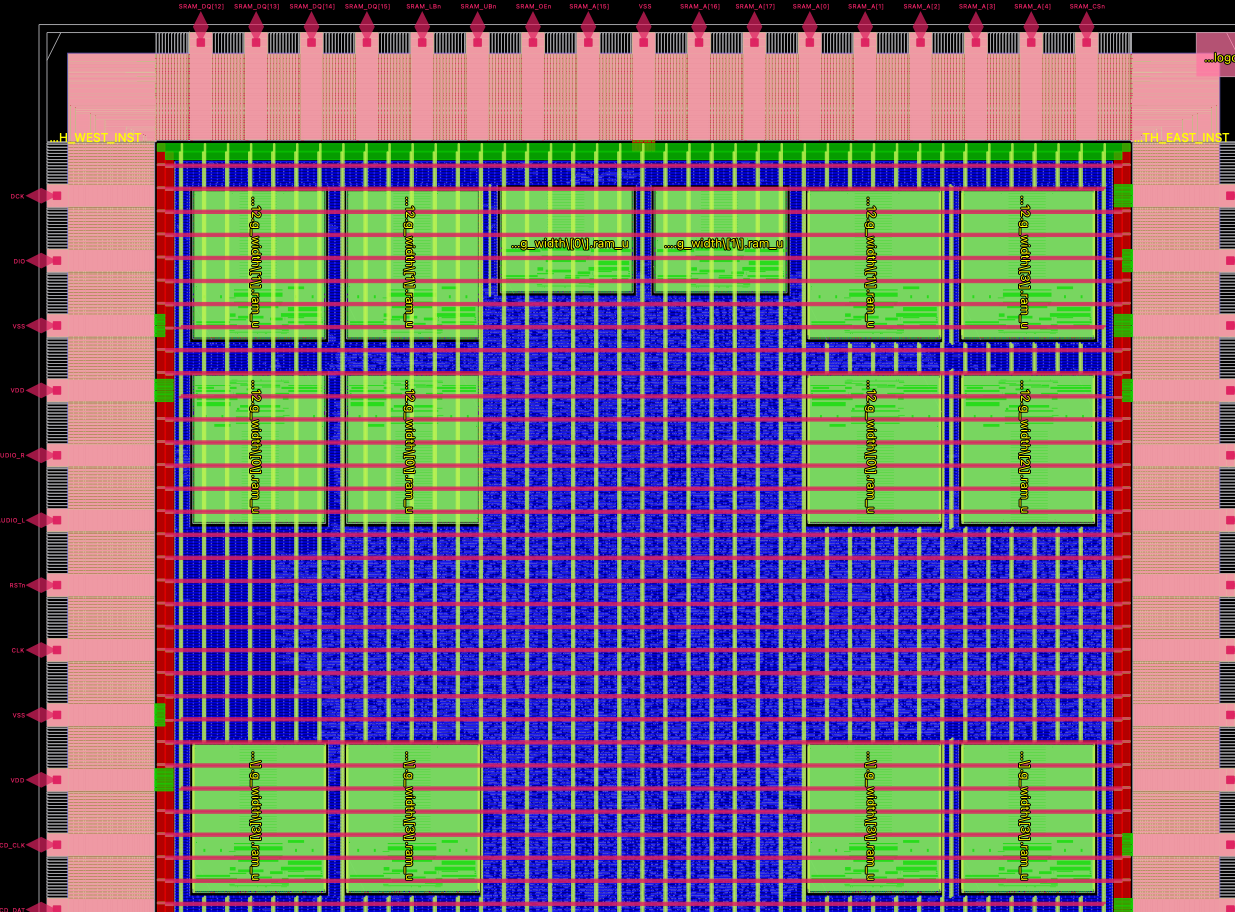
I attached a picture of my power nets. For some SRAMs, the M4 vertical stripes go straight over the top of the SRAMs, which is what I'd expect. The other SRAMs seem to punch a hole in M4. Any ideas what might be causing this? One other thing that's suspicious is the extra runt stripes visible between the instances in the top right -- these are offset 29 um to the right of the main grid. I'm using the PDN tcl snippet from the template project to add the straps down the east/west sides of each macro (all in N or S orientation). This is adapted to cover all of my instances but otherwise the same as the template project. proc sram_pdn_ns {pdnname macrolist} { define_pdn_grid \ -macro \ -instances $macrolist \ -name $pdnname \ -starts_with POWER \ -halo "$::env(PDN_HORIZONTAL_HALO) $::env(PDN_VERTICAL_HALO)" add_pdn_connect \ -grid $pdnname \ -layers "$::env(PDN_VERTICAL_LAYER) $::env(PDN_HORIZONTAL_LAYER)" add_pdn_connect \ -grid $pdnname \ -layers "$::env(PDN_VERTICAL_LAYER) Metal3" add_pdn_stripe \ -grid $pdnname \ -layer Metal4 \ -width 2.36 \ -offset 1.18 \ -spacing 0.28 \ -pitch 426.86 \ -starts_with GROUND \ -number_of_straps 2 } sram_pdn_ns pdn_cpu_iram {i_chip_core.iram_u.sram.*.ram_u} sram_pdn_ns pdn_apu_ram {i_chip_core.apu_u.ram_u.sram.*.ram_u} sram_pdn_ns pdn_ppu_sbram {i_chip_core.ppu_u.*.ram_u} I'm not getting any DRCs but I expect punching holes in the vertical routing like that is not good for power integrity.
Avatar
I looked at this a bit further. There were no DRC errors but there were some very interesting warnings: [WARNING PDN-0231] i_chip_core.ppu_u.blender.palette_mapper.pram_u.g_d256.g_width\[0\].ram_u is not connected to any power/ground nets. [WARNING PDN-0231] i_chip_core.ppu_u.blender.palette_mapper.pram_u.g_d256.g_width\[1\].ram_u is not connected to any power/ground nets. [WARNING PDN-0231] i_chip_core.ppu_u.scanbuf0_u.g_d512.g_width\[0\].ram_u is not connected to any power/ground nets. [WARNING PDN-0231] i_chip_core.ppu_u.scanbuf0_u.g_d512.g_width\[1\].ram_u is not connected to any power/ground nets. [WARNING PDN-0231] i_chip_core.ppu_u.scanbuf1_u.g_d512.g_width\[0\].ram_u is not connected to any power/ground nets. [WARNING PDN-0231] i_chip_core.ppu_u.scanbuf1_u.g_d512.g_width\[1\].ram_u is not connected to any power/ground nets. [WARNING PDN-0231] chip_id is not connected to any power/ground nets. [WARNING PDN-0231] wafer_space_logo is not connected to any power/ground nets. [WARNING PDN-0231] i_chip_core.ppu_u.blender.palette_mapper.pram_u.g_d256.g_width\[0\].ram_u is not connected to any power/ground nets. [WARNING PDN-0231] i_chip_core.ppu_u.blender.palette_mapper.pram_u.g_d256.g_width\[1\].ram_u is not connected to any power/ground nets. [WARNING PDN-0231] i_chip_core.ppu_u.scanbuf0_u.g_d512.g_width\[0\].ram_u is not connected to any power/ground nets. [WARNING PDN-0231] i_chip_core.ppu_u.scanbuf0_u.g_d512.g_width\[1\].ram_u is not connected to any power/ground nets. [WARNING PDN-0231] i_chip_core.ppu_u.scanbuf1_u.g_d512.g_width\[0\].ram_u is not connected to any power/ground nets. [WARNING PDN-0231] i_chip_core.ppu_u.scanbuf1_u.g_d512.g_width\[1\].ram_u is not connected to any power/ground nets. These are exactly the RAMs which have M4 overroute in my screencap, and they were missing their RTL VDD/VSS connections. Now that's fixed, they also punch holes in M4.
03:28
I think the ideal setup would be for the main M4/M5 grid to continue over the SRAMs, and the M4 vertical straps on west/east edges of the SRAMs would then just via up in multiple places to the M5 horizontal stripes. Is this achievable? I had a look through the flags for define_pdn_grid in the openroad docs but I didn't see anything super promising.


Avatar
Tim 'mithro' Ansell 11/23/2025 23:28
@Leo Moser (mole99) / @Tim Edwards - Any ideas?
Avatar
Leo Moser (mole99) 11/24/2025 08:52
Yeah, I don't think that's achievable at the moment. I think the holes in the PDN are due to the -halo option, which cuts the PDN straps. For now, you can make the PDN straps on Metal5 thicker to reduce IR-drop across the chip. But for the ideal solution we need to open a feature request in OpenROAD. @LukeW If you would like to report this, I can show you how to create a standalone reproducible from a LibreLane step.
Avatar
Thanks, no worries. I asked a coworker about this today and they confirmed we would normally continue our M7/M6 "waffle" (on TSMC40) over the top of RAMs, so I don't think what I'm trying to do is too weird. As a workaround, maybe I could add some M4 vertical straps to the SRAM GDS just to keep the M5 horizontals all nailed together? I think I have a few tickets to file on OpenROAD after the dust clears 🙂 (edited)
👏 1
10:04
. I think the holes in the PDN are due to the -halo option, which cuts the PDN straps.
I thought that too, but in that case I can't explain why it's not also cutting the M5 horizontals?
Avatar
It's on sky130, but when I place my macros there, I can get pdngen to just continue the met4 rails over them, so there might already be some magic incantation to do that.
10:09
( That's how I power my ROM and register files macro in TT ).
👍 1
Avatar
Interesting, I have a couple experiments to try when I get home then. Maybe it's adding the add_pdn_stripe on M4 (for connecting up the pins on east/west edge) that is causing it to punch a hole in M4? In that case I could try the pre-strapped RAM GDS someone shared on GitHub. Thanks 🙂
Avatar
I think the trick is to make sure that both your macro pdn grid and the macro itself have nothing in M4. Then pdngen see that it's all clear and it can just continue the existing rails. If you have anything in M4 either in the LEF or trying to create things yourself, it will carve a hole the size of the macro.
👍 1
Avatar
Leo Moser (mole99) 11/24/2025 10:29
@tnt we use add_pdn_stripe to add a pair of Metal4 straps on either side of the SRAM macro, in order to easily connect it to the PDN straps on Metal5. This is probably why OpenROAD considers that layer to be blocked.
Avatar
How do the SRAM power connections work on SKY130 then? I think having a bunch of VDD/VSS on the edges of a RAM is quite normal 🤔
10:34
Does it just have some M3 straps that get via'd up in multiple places to the M4 rails?
Avatar
Well those macro have M3 straps at various places and they're meant to wire up to M4 rails.
Avatar
ah ok, yeah
10:35
I guess for this tapeout I'll just add some M4 rails to the RAM GDS so my M5s are all still nailed together, but the GF180 RAMs could probably be tweaked to hook up in a way more like the SKY130 ones
10:36
or I could leave it-- it's all 5V after all
10:36
thanks, I didn't do any SKY130 tapeouts other than TT so never saw the macros
Avatar
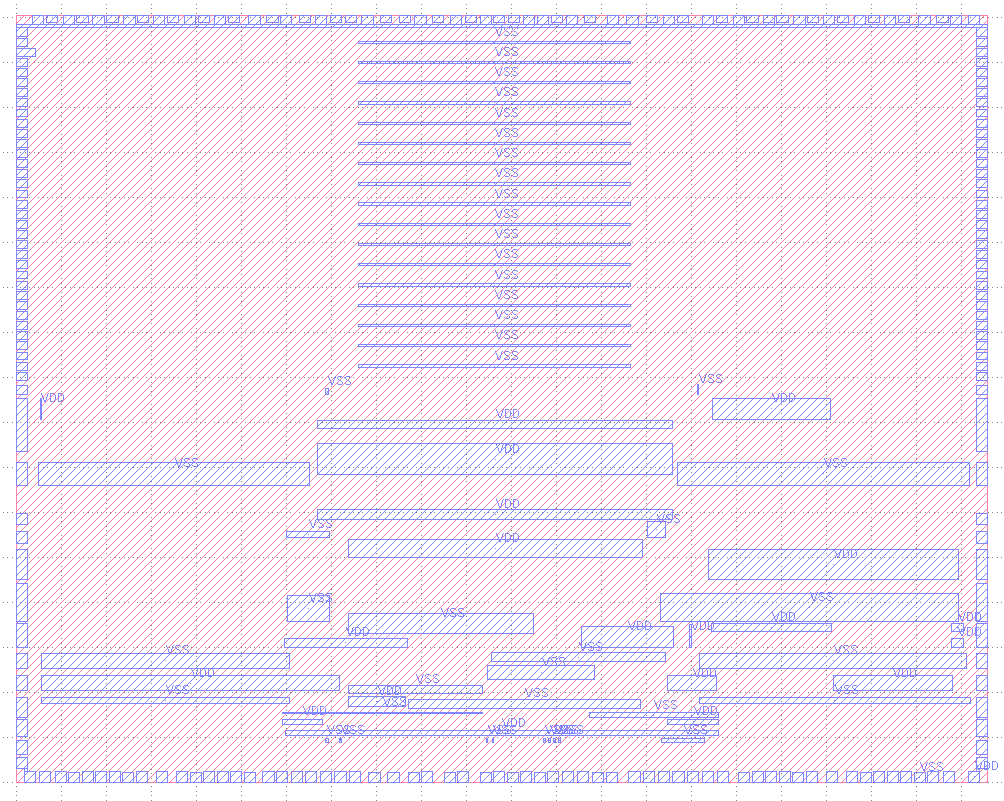
Looking at the LEF there are a whole bunch of horizontal M3 VDD/VSS pins that aren't getting connected at the moment due to the hole in M4 (here for 256x8 memory):
Avatar
Leo Moser (mole99) 11/24/2025 15:50
Yes, the problem is that those pins are not really... structured. So it's hard to hook them up to the PDN without careful placement. That's why I added the Metal4 straps on both sides. As long as they cross Metal5, you are fine. But connectivity could be better, perhaps a custom wrapper is the best solution after all.
Avatar
I talked to a layout engineer on my lunch break and they suggested adding M3 rings around the RAM so it works in both orientations without any additional PDN config. I think you would still have reasonable access to data pins via M2
Avatar
and yeah I realise it's hard to get all of them but is it really ok to have the SRAM powered only by its west and east edges? None of the rails in that LEF screencap are connected up to M4. Seems like you could get a lot of ground bounce in the centre
Avatar
One thing to consider is it's 5V. 0.1V bounce for a 5V vdd will matter way less than the same 0.1V when your vdd is 1.1v 🙂
Avatar
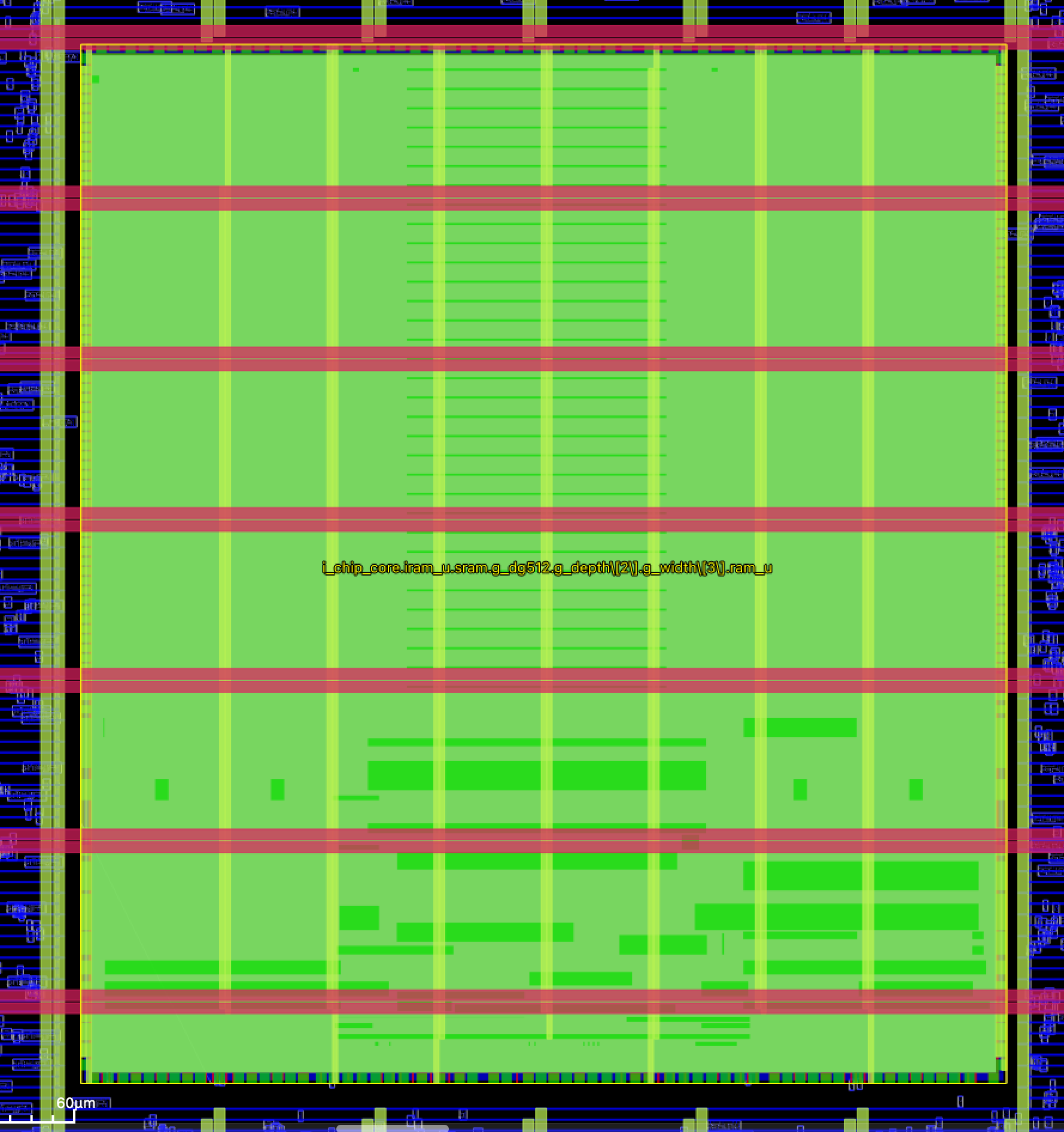
Yeah that's true 😅 I settled on just a few more stripes to connect the macro's M3 rails up to M5. Still don't like the M4 slot below the macro
17:16
# Strap pins on east/west edges of RAM add_pdn_stripe \ -grid $pdnname \ -layer Metal4 \ -width 2.36 \ -offset 1.18 \ -spacing 0.28 \ -pitch 426.86 \ -starts_with GROUND \ -number_of_straps 2 # Due to the above, we've punched an SRAM-sized hole in our M4 vertical # rails. Put some small rails over the top of the macro just to nail M5 # back together. We still have an awful slot in the M4 routing above and # below the macro; it's 5V, I'm sure it's ok add_pdn_stripe \ -grid $pdnname \ -layer Metal4 \ -width 2.36 \ -offset 65.93 \ -spacing 0.28 \ -pitch 50 \ -starts_with GROUND \ -number_of_straps 7
Avatar
I filed a ticket just so this isn't forgotten: https://github.com/wafer-space/gf180mcu-project-template/issues/31
Writing up the discord thread so we still remember it post-shuttle. The PDN config has this line to add an M4 strap down each side of the RAM: gf180mcu-project-template/librelane/pdn_cfg.tcl Line 2...
Avatar
Avatar
LukeW
Yeah that's true 😅 I settled on just a few more stripes to connect the macro's M3 rails up to M5. Still don't like the M4 slot below the macro
Leo Moser (mole99) 11/24/2025 18:33
That's clever! I didn't think of adding another call to add_pdn_stripe (not sure why 😅). Initially, I tried connecting the pins directly to the Metal4 straps using add_pdn_connect, but with that you need to line up the macro with the pins. That's why I resorted to adding the stripes on the sides. I think it would be good to add your additional stripes to the template too. Maybe I'll make them slightly thicker, since I chose 2.36 only because the pins on the sides are so thin.
Avatar
Tim 'mithro' Ansell 11/24/2025 22:21
@LukeW - GF180MCU actually has some configurations with even less metal layers. I wonder if there is any consideration for that fact in the SRAM design?
Avatar
I mean the RAM is solid up to M3 so if you don't have at least one layer for over-route then you're a bit screwed 😅 but yeah it's possible they have the edge pins so that you can have M4 fully available for routing over the RAM?
22:24
I guess you can do it without any layers above M3, just impossible to route over the RAM 🤔 would wafer.space ever do an MPW with just three metal layers?
Avatar
Leo Moser (mole99) 11/25/2025 10:45
10:45
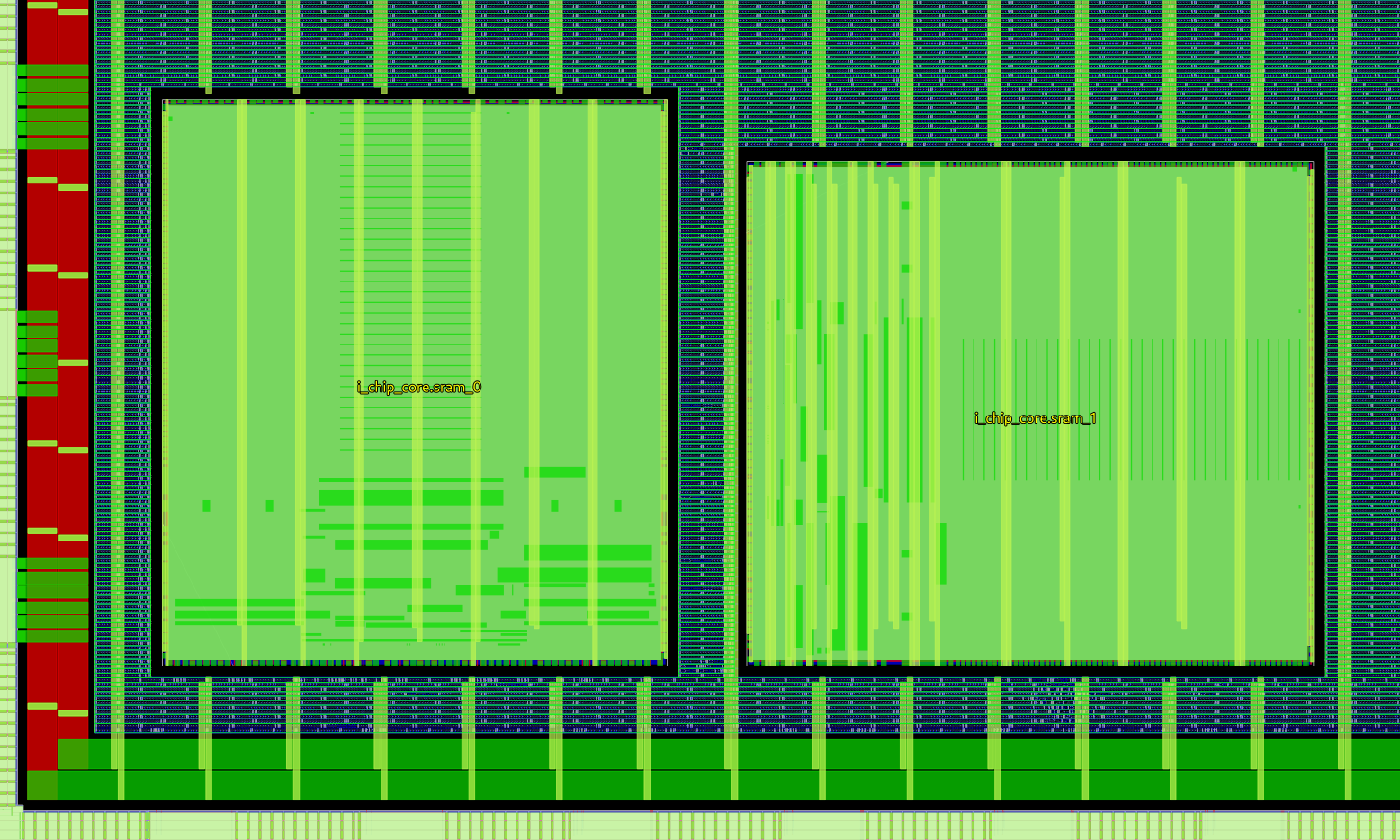
@LukeW what do you think of this? https://github.com/wafer-space/gf180mcu-project-template/pull/32 I used your stripes for the N/S orientation, but made them slightly thicker (4um). The W/E orientation is more awkward: There I added more stripes closer together in the first half for a good connection to the pins underneath, as well as some stripes spaced further apart.
Avatar
sure, I replied on GitHub just so on the next shuttle when we're like "why did we do that?" there's a record
Exported 34 message(s)
Timezone: UTC+0